Desk Worker Posture: How to Check Your Standing Posture
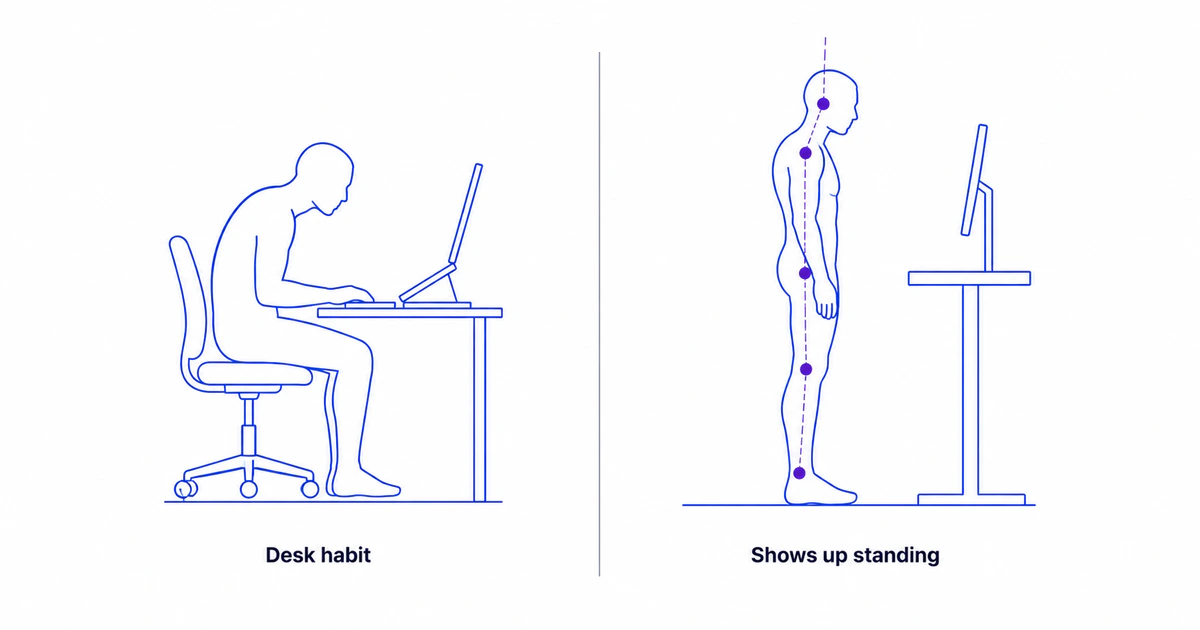
Spending most of the day at a desk doesn’t doom your posture, but sustained sitting and screen work do tend to reinforce a recognizable cluster of patterns over time: the head drifting forward, the upper back rounding, the pelvis and lower back adapting to long sitting, and small left-right asymmetries from one-sided habits like mousing or cradling a phone. None of these are inevitable or, by themselves, a diagnosis — but they’re worth being able to see. This guide explains what desk work and sustained sitting tend to do to your posture, how desk workers can check their standing posture with a front and side photo, and when the patterns are worth a clinician’s attention.
- Desk work doesn’t cause bad posture deterministically — it tends to reinforce a cluster of patterns over time.
- The common cluster: forward head, rounded upper back, a sitting-adapted pelvis and lower back, and one-sided asymmetry.
- These habits build up while sitting but show up in a standing posture photo — which is what a screen captures.
- A front + side photo lets a desk worker see and track the patterns over weeks, not guess.
- The patterns are common and often harmless on their own; persistent or painful ones are for a clinician — and a photo is a screening start, not a diagnosis.
The desk-work posture cluster at a glance
| What it looks likeIn a standing photo | Which viewFront or side | |
|---|---|---|
| Forward head | Ear sits ahead of the shoulder | Side view |
| Rounded upper back | Exaggerated upper-back curve | Side view |
| Anterior pelvic tilt | Pronounced lower-back arch | Side view |
| Left-right asymmetry | Uneven shoulders or hips | Front view |
What sitting at a desk all day tends to do to posture
Desk work doesn’t doom anyone to bad posture, and it’s worth saying clearly: posture varies enormously between people, and plenty of desk workers have perfectly unremarkable posture. What sustained sitting and screen work do is tend to reinforce a particular cluster of patterns over months and years — the body adapts to the positions it spends the most time in.
That cluster has four recognizable members: the head drifting forward toward the screen, the upper back rounding, the pelvis and lower back adapting to long hours of sitting, and small left-right asymmetries that build from one-sided habits. They often travel together, which is why “desk-job posture” is a recognizable look rather than a single sign.
One important detail shapes how you check for them. These patterns are built while sitting, but they’re most reliably seen while standing — the habitual sitting position gradually becomes the body’s default, and that default shows up when the person stands up straight and relaxed. That’s why a posture screen uses standing photos, not seated ones: the standing photo captures the accumulated result, not just the momentary slump.
What good sitting posture actually looks like
If desk work tends to reinforce these patterns, the natural question is how to sit so it reinforces less of them. It helps to start with a caveat: there is no single “correct” sitting position that’s right for everyone or that you’re supposed to hold all day. Comfortable, sustainable sitting is generally described as a relaxed neutral — the spine roughly in its natural curves, weight evenly supported, nothing strained — rather than a rigid, military-straight pose. The points below describe what that relaxed neutral commonly looks like, as a reference rather than a rulebook.
- Feet flat and supported. Feet resting flat and fully supported, with the hips sitting at or slightly above knee height, so the thighs slope very gently down and the weight settles through the seat rather than the edge.
- A neutral lower back. The lower back sitting close to its natural inward curve rather than slumped into a long C-shape, with the chair’s back support meeting it comfortably.
- Screen near eye level. The top of the monitor roughly at eye level and an arm’s length away, so the head can stay stacked over the shoulders instead of drifting toward the screen. This is the single setup factor most associated with the head-forward pattern desk work tends to reinforce.
- Relaxed shoulders, elbows around a right angle. Shoulders down and easy rather than hunched, with the elbows bent near 90 degrees and the forearms supported, so the upper back isn’t doing constant work to hold the arms up.
- Frequent position changes. Shifting position, standing, and moving regularly through the day, rather than holding any one posture — even a textbook-perfect one — for hours at a stretch.
That last point matters more than any of the others, and it’s worth stating plainly: movement variation tends to beat any single “perfect” position. A neutral setup gives the body a good default to return to, but the spine is built to move, and the most consistently described problem with desk work isn’t a specific posture so much as holding one position — any position — for too long. Treating these points as a comfortable home base to keep drifting back to, while changing things up often, is closer to how the body is meant to be used than chasing one ideal pose.
To turn that idea into an easy follow-through after a screen, try the simple post-screen routine: a two-minute movement break, a saved baseline, and a consistent re-check rather than a promise to “fix” posture.
None of this is a treatment plan, and adjusting your seat or screen won’t undo or “fix” a posture pattern on its own — setup is one contributing factor among many, not a cure. If you’re sitting with persistent pain, stiffness, numbness, or tingling, that’s a reason to see a licensed physiotherapist, physician, or chiropractor rather than to keep adjusting your chair; those symptoms are commonly associated with a mix of factors and aren’t something a desk setup, or a self-check photo, can diagnose.
The screen-gaze patterns: forward head and rounded upper back
The two most recognizable members of the cluster come from looking at a screen for hours. When a monitor or laptop sits below eye level — or a person leans toward it — the head moves forward and slightly down, and the upper back rounds to follow. Over time, the standing posture keeps some of that shape.
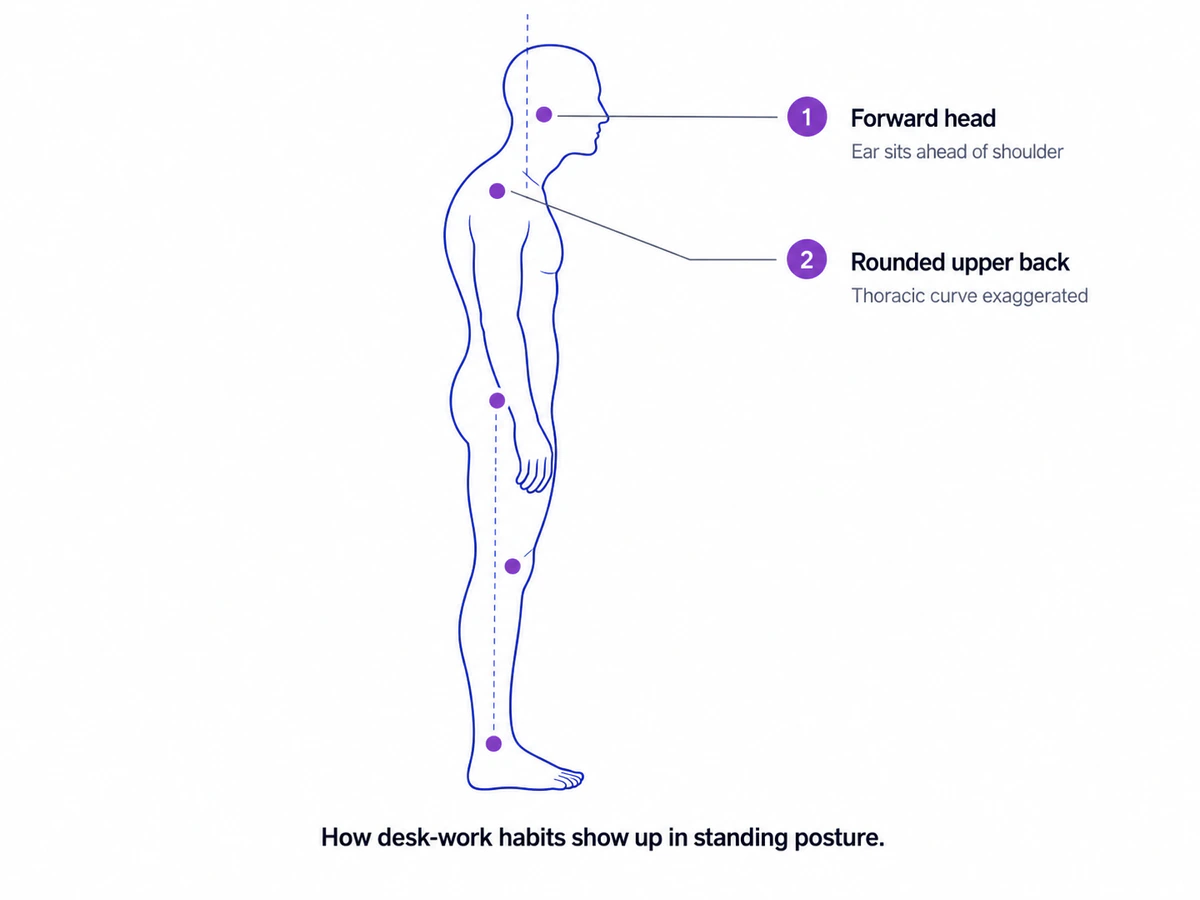
In a side-view standing photo, the signs are clear: the ear sits ahead of the shoulder instead of stacked over it, and the upper-back curve looks more pronounced than a relaxed neutral. The head-forward pattern specifically is what most people mean by tech neck, and the broader, context-independent version is known clinically as forward head posture. Rather than repeat what those guides cover, this is the place to recognize the pattern and follow the link for the detail — including how each is measured and when it matters.
The seated patterns: pelvis and lower back
Long hours of sitting also influence the pelvis and lower back, though the picture here is more individual. How someone sits matters: a person who perches forward loads the lower back differently from one who slumps back into the chair, so the standing pattern that develops varies from person to person.
In a standing side-view photo, one pattern that can show up is an exaggerated lower-back arch with the pelvis tipped forward — the visible signs of anterior pelvic tilt. It’s not universal among desk workers, and a degree of pelvic tilt is common and usually unremarkable, so the value of a photo here is simply seeing which way, if any, your own pelvis is biased rather than assuming. The anterior pelvic tilt guide covers what the pattern looks like and how to interpret it.
The one-sided patterns: asymmetry from daily habits
The fourth member of the cluster comes not from sitting itself but from the small, repeated one-sided habits that fill a desk day: mousing with the same hand, cradling a phone against one shoulder, turning toward a second monitor that’s off to one side, or carrying a bag on the same shoulder to and from work.
In a front-view standing photo, these can show up as a shoulder or hip that sits a little higher on one side, or a head that tilts slightly. As with the others, small left-right differences are extremely common and usually harmless — near-perfect symmetry is the exception, not the rule. What a photo offers is the ability to notice a notable or changing difference rather than guess. The detail on what to look for, and the everyday causes behind it, is in the guide to uneven shoulders and hips.
How desk workers can check their standing posture
Checking for the whole cluster takes the same two photos as any posture self-check: one from the front and one from the side, against a plain wall, standing relaxed in your normal stance. Put the phone at hip height and level, and stand far enough back that your body fills about two-thirds of the frame height: roughly 2 m on the 1× lens or 3 m on 2×, our estimate. The full how-to-check-your-posture guide walks through the setup, and how to take posture photos covers camera height and distance in detail. The only desk-specific tweak is cadence.
Because desk-work patterns accumulate slowly, a single photo tells you less than a series. Re-checking on a regular schedule — monthly is a reasonable rhythm — and watching the trend is far more informative than one snapshot, especially if you change something about your setup or routine in between. The sample report shows what a full readout of the patterns looks like, and the methodology documents the exact capture protocol.
A word on ergonomics and limits. Setup factors like screen height and seat position do influence the positions you hold all day, and adjusting them is a reasonable step — but a posture photo is a screening tool, not an ergonomic prescription or a medical assessment. When a pattern is notable, getting worse over time, or comes with persistent pain, stiffness, or numbness, the right next step is a licensed physiotherapist, physician, or chiropractor who can examine the full picture.
How PosturaScreen helps desk workers track posture
For an individual desk worker, the workflow is simple: two photos produce 17 measurable metrics, the patterns in the cluster are flagged against their reference ranges, and re-screening over the months shows whether desk habits are nudging posture in one direction or another. The estimates that stand in for 3D angles carry an honest approx tag, and the screen is a tracking tool, not a diagnosis.
Physiotherapy or chiropractic practices can also add the same screen to intake for desk-job clients as a repeatable step in a static postural assessment — the basis of posture screening software for practitioners, and something some practices offer as a paid service. Because every screen computes the same metrics the same way, one person’s change is comparable across months. As always, it’s a screening and tracking tool that supports clinical judgment rather than replacing examination, and the information here is educational, not medical advice.
Frequently asked questions
Does sitting at a desk all day ruin your posture?
Not on its own, and not inevitably. Sustained sitting and screen work tend to reinforce certain patterns over time — the head drifting forward, the upper back rounding, the pelvis adapting to long sitting, and small asymmetries from one-sided habits. But posture varies a lot between people, these patterns are common and often harmless by themselves, and they can change. A photo is a useful way to see where you actually sit on that spectrum rather than guessing.
What does desk-job posture look like?
The most recognizable signs show up in a side-view standing photo: the ear sitting ahead of the shoulder (forward head), and a more rounded upper back. A front view may show uneven shoulders or hips from one-sided habits like mousing or cradling a phone. These are the same patterns covered in the individual posture guides — desk work just tends to reinforce several of them together.
I work from home — is my posture worse than in an office?
Not necessarily worse, but home setups often differ from offices — laptops on sofas, beds, or kitchen tables rarely place the screen at eye level, which biases the head forward. The posture patterns are the same regardless of where you sit; what matters is total time in a flexed, forward position and how varied your day is. Checking with a photo works the same way at home or in an office.
Can I check my desk-work posture myself?
Yes. Take a front and a side photo with your phone level at hip height, against a plain wall, standing relaxed. Stand far enough back that your body fills about two-thirds of the frame height (roughly 2 m on the 1× lens or 3 m on 2×, our estimate). The side view shows forward head and upper-back rounding; the front view shows left-right evenness. Because desk habits build up slowly, the most useful approach is to re-check on a regular cadence — say monthly — and watch the trend rather than a single photo.
Should I worry about the posture patterns desk work causes?
By themselves, no — they’re common and a photo finding isn’t a diagnosis. They become worth a clinician’s attention when they’re notable, when they’re getting worse over time, or when they come with persistent pain, stiffness, or numbness. In those cases a licensed physiotherapist, physician, or chiropractor can assess the full picture. A self-check photo is a screening starting point, not a verdict.
Can a physiotherapist or chiropractor track a desk worker’s posture?
Yes. A practitioner can use the same front and side photos as a repeatable assessment for desk-job clients, saving and comparing each client’s screens over time on a Pro account. Every screen produces the same 17 metrics the same way, so one person’s change over time is comparable. PosturaScreen is a screening and tracking tool, not a diagnostic device.
This article was prepared by the PosturaScreen editorial team for posture education. It is not medical advice and is not a substitute for a clinical evaluation. PosturaScreen is a screening and tracking tool, not a diagnostic device. If you have concerns about your posture or musculoskeletal health, consult a licensed healthcare professional. See our editorial standards for how this article was written and reviewed.
Free posture screening, in seconds.
Start with one photo. Add the second for all 17 metrics. No account or app required.
Start a free posture screen