How to Check Your Posture at Home With a Photo
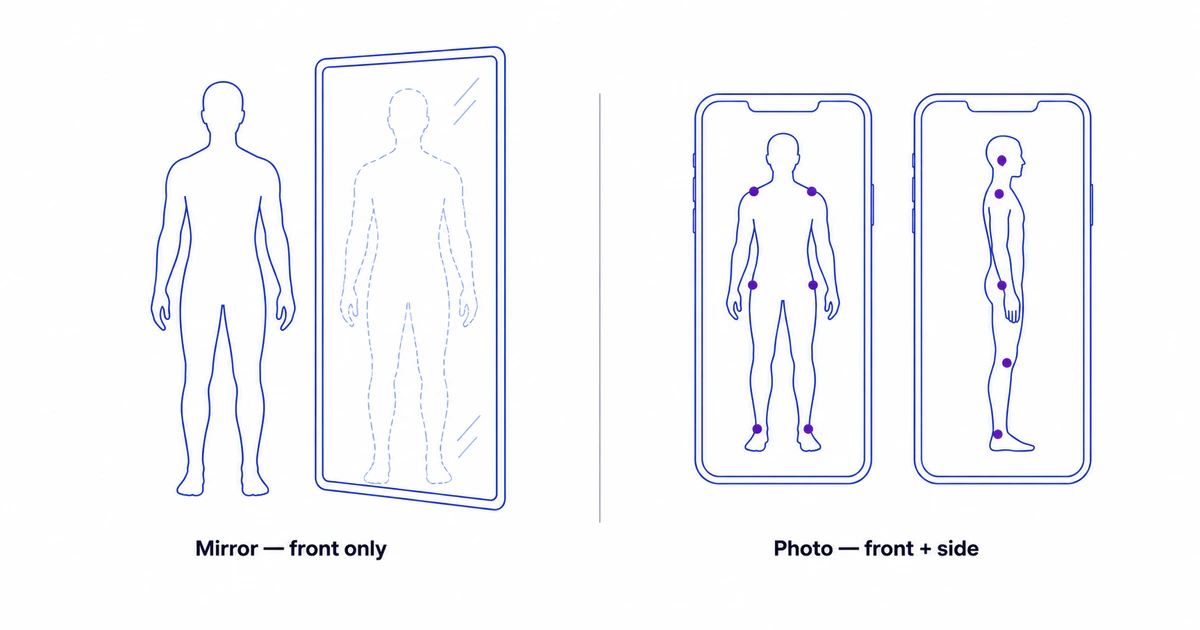
To check your posture at home, take two phone photos, one facing the camera and one side-on, and look at a few landmarks: from the front, whether your shoulders and hips are level; from the side, whether your ear, shoulder, hip, knee and ankle sit near one vertical line. Photos work better than a mirror because they show your side profile, keep left and right the right way round, and can be compared weeks later.
Why a photo beats a mirror for checking posture
The mirror is the default tool for checking how you look, so it’s the natural first reach for checking posture too. But for posture specifically, it has built-in blind spots that a photo doesn’t.
A mirror only shows you from the front. The single most informative posture view — the side profile, where a forward head, rounded upper back, and exaggerated or flattened spinal curves are visible — is the one a mirror can’t give you. The moment you turn to catch your side in the glass, you’ve twisted your spine and changed the very thing you were trying to see. A mirror also flips left and right, so a higher right shoulder looks like a higher left one. And it keeps nothing: the image is gone the instant you step away, so there’s no way to compare today against six weeks from now.
A photo solves all of that. Two shots capture both the front and the side. They hold perfectly still, so you can study the alignment instead of glancing. And they can be saved and lined up against a later set. The difference is simple: a mirror gives you an impression in the moment; a photo gives you a record you can measure against.
What “good posture” does and doesn’t mean
Before reading a photo, it helps to drop the idea that good posture means standing rigidly to attention. Forcing the shoulders back and the chest up is its own kind of strain, and it’s not what a relaxed, well-aligned body looks like.
Good posture is closer to effortless alignment: the ear sits roughly over the shoulder, the natural curves of the spine are present without being exaggerated, and the left and right sides are reasonably even. Posture also sits on a spectrum — small left-right differences and individual variation are normal. A self-check isn’t a pass/fail test against a perfect pose. It’s a way to notice patterns and to see whether they change over time.
How to take a usable front and side photo
The setup matters more than the camera. Prop the phone at about hip height and keep it level, not tipped up, down or sideways. Stand far enough back that your body fills about two-thirds of the frame height: roughly 2 m on the 1× lens or 3 m on 2× (our estimate). Use a plain wall and fitted clothing, and stand the way you normally stand: relaxed, weight even on both feet, eyes forward.
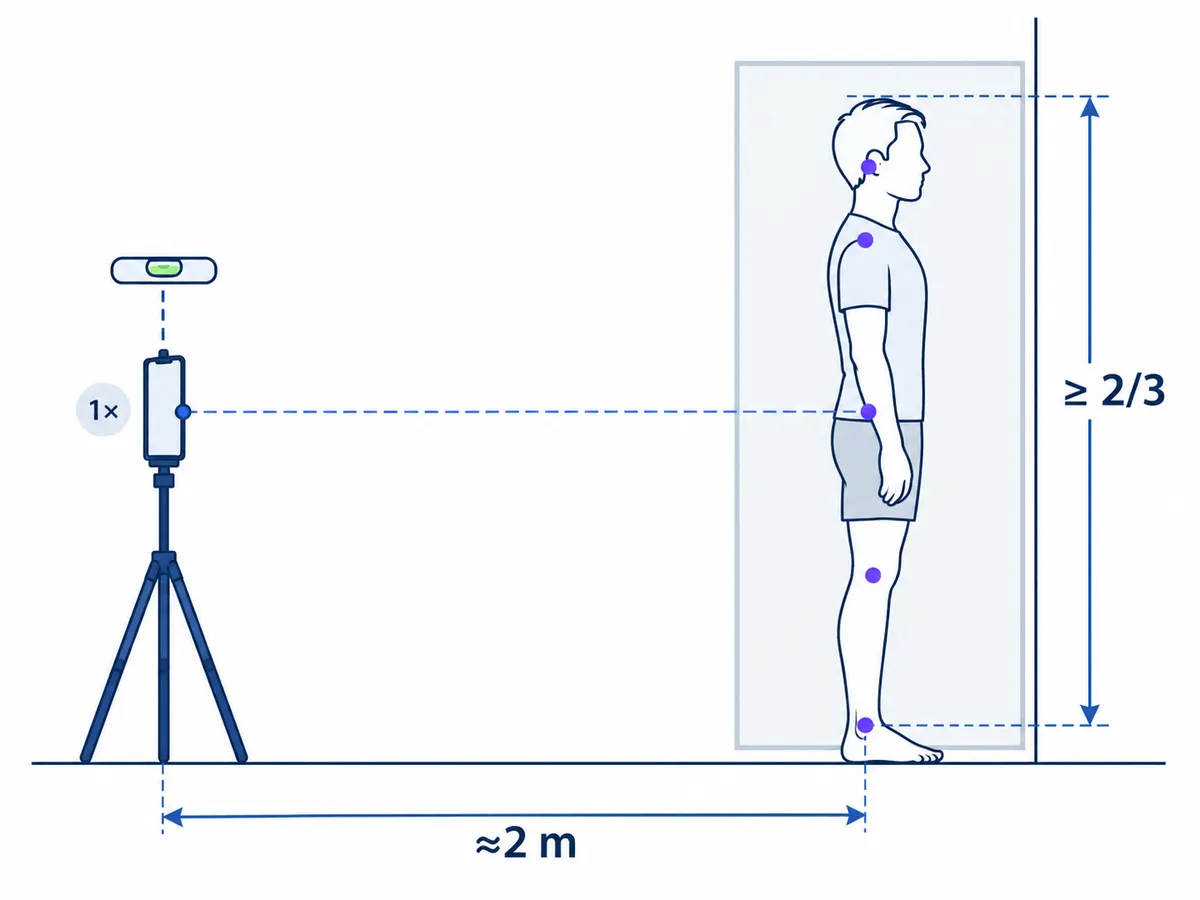
Take two photos: one facing the camera (front view) and one side-on (pick left or right and keep it for next time). Don’t “fix” your posture before the shutter; the point is your default stance. Lens choice, levelling, clothing and the most common setup mistakes are covered step by step in the full photo setup guide.
What to look for — front view
The front photo is about left-right evenness. Working top to bottom, look at three things.
First, the head: is it centered, or does it tilt toward one side? Second, the shoulders: does one sit noticeably higher than the other? Third, the hips: is one hip riding up relative to the other? A tilted line across the shoulders or hips is the clearest signal, as long as the phone was level.
None of this is a diagnosis — small differences are common. What a notable left-right difference looks like in detail is covered in the guide to uneven shoulders and hips.
What to look for — side view
The side photo is where the most-discussed posture patterns show up, because it reveals the front-to-back dimension a mirror never can. A useful reference is the plumb line posture test: seen from the side, the ear, shoulder, hip, knee and ankle sit near one vertical line.
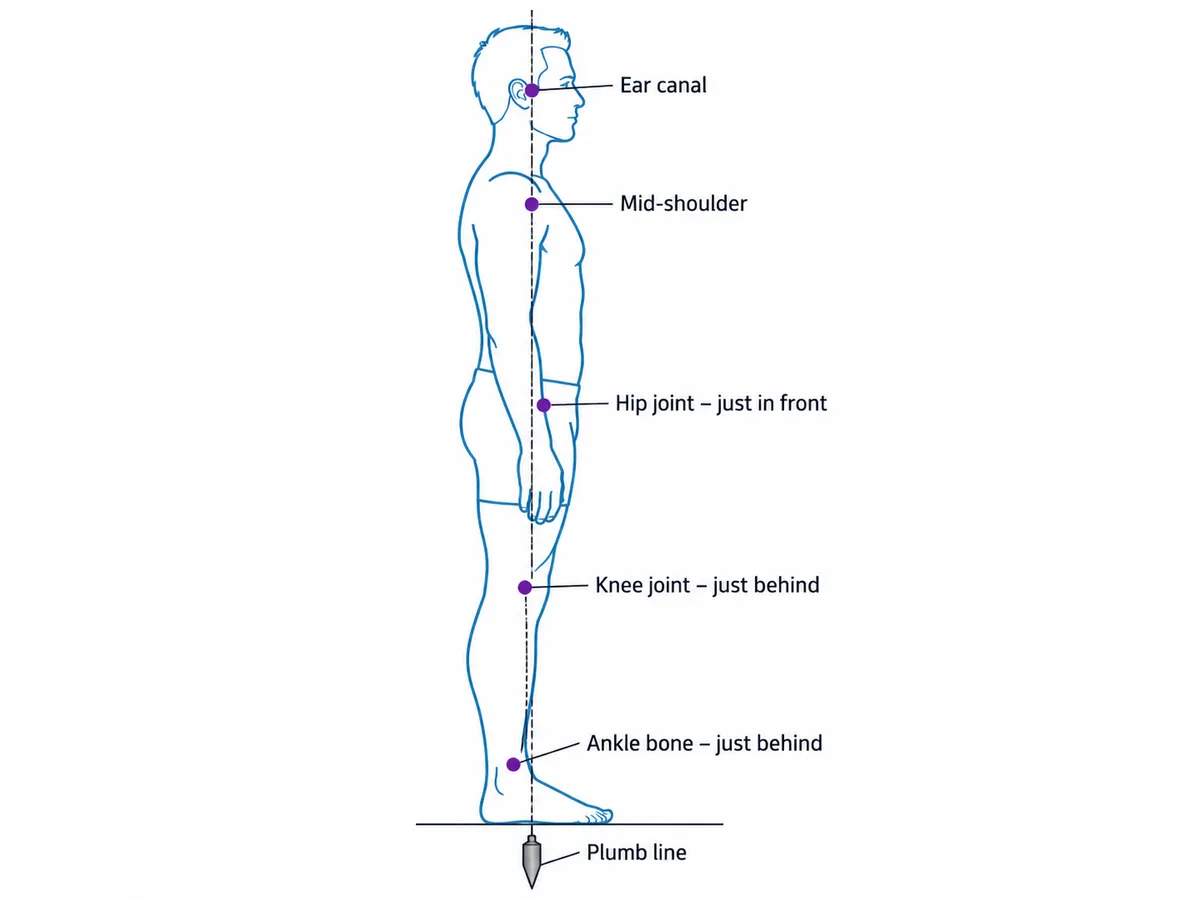
Look first at the head and neck: does the ear sit roughly over the shoulder, or does the head jut forward of it? A head that sits well ahead of the shoulders is the defining sign of tech neck, and the broader pattern is known clinically as forward head posture. Next, look at the lower back: is the curve gentle and natural, or pronounced and arched? An exaggerated lower-back arch with a forward-tipped waistline is the visible sign of anterior pelvic tilt. Finally, look at the upper back: is it gently rounded, or more rounded than feels natural?
Again, these are visual patterns to notice, not conditions to self-diagnose. Each linked guide explains what the pattern looks like and when it’s worth a closer look.
From self-check to tracking
A single photo is a starting point, not a verdict. Its value grows the second time you take it. Re-shoot under the same conditions — same camera height, distance, lighting, and stance — every few weeks, and line the two sets up. Matching the setup matters because camera height, tilt and stance also move what you see, so a difference between two photos is not, by itself, proof that your posture changed. This kind of periodic check pairs well with the daily habit changes — desk height, screen position, movement breaks — covered in the guide to desk worker posture.
Reading photos by eye works for spotting obvious patterns. To turn the impression into numbers — a head-forward angle, a shoulder-height difference — you need consistent measurement, which is where a posture check app helps. PosturaScreen calculates the metrics available from either view and completes all 17 posture metrics when both are supplied, with approx tags on the estimates. The one-off free online posture check needs no account; Free Personal saves one person’s assessments so you can compare them later, and the comparison shows whether each value increased, decreased or stayed the same. The step-by-step PosturaScreen guide shows the complete capture-to-report workflow.
Once you have a report, the guide to what to do after a posture screen explains how to use it as a baseline, take a short movement break, and plan a consistent re-check without treating a flag as a diagnosis.
A home check, by eye or by app, is a screening starting point, not a diagnosis. If something looks notable, won’t go away, or comes with pain, stiffness, or numbness, the right next step is a licensed physiotherapist, physician, or chiropractor who can examine you properly.
This article was prepared by the PosturaScreen editorial team for posture education. It is not medical advice and is not a substitute for a clinical evaluation. PosturaScreen is a screening and tracking tool, not a diagnostic device. If you have concerns about your posture or musculoskeletal health, consult a licensed healthcare professional. See our editorial standards for how this article was written and reviewed.
Free posture screening, in seconds.
Start with one photo. Add the second for all 17 metrics. No account or app required.
Start a free posture screen