Posture analysis software for clinics
Use PosturaScreen in your browser to review posture, save client assessments and compare changes over time. Try a free screen with one photo; add front and side views for all 17 metrics. Professional plans include clinic-branded reports.
Review, explain and compare posture.
Postural analysis software brings annotated photos, screening measurements and client history into one workflow for your practice.
Record an intake baseline.
Save standing photos and a posture report at intake so you have a documented baseline for follow-up visits.
Show measurable progress.
Put two saved assessments side by side to review changes in the measurements and photos with your client.
About five seconds of analysis.
It slots into a normal appointment — no long protocol, no markers to place, no workflow to rebuild.
A report they take home.
Share a printable PDF with annotated photos, posture metrics and your clinic details.
Numbers, not eyeballing.
Computerised posture analysis records visible alignment in 17 metrics from front and side photos. Review the measurements alongside the images and your clinical assessment.
The phone is the camera.
Your client scans a QR code and shoots on their own phone. Nothing to buy, nothing to install, runs in any browser.
Three steps, start to report.
No app to install — just the browser on your computer and a phone your client already owns.
Capture
Start an assessment, show the QR code. The client scans it, takes a front and side photo, and the images appear on your screen — or upload them yourself.
Analyze
The AI detects 17 body landmarks and flags anything outside the normal range, with annotated images — typically in under five seconds.
Review & send
Walk the client through their report, print or share it, and re-screen later to show measurable progress over time.
Explore the clinic workflow
Example screens using a test profile. These illustrate the interface, not a clinical outcome.
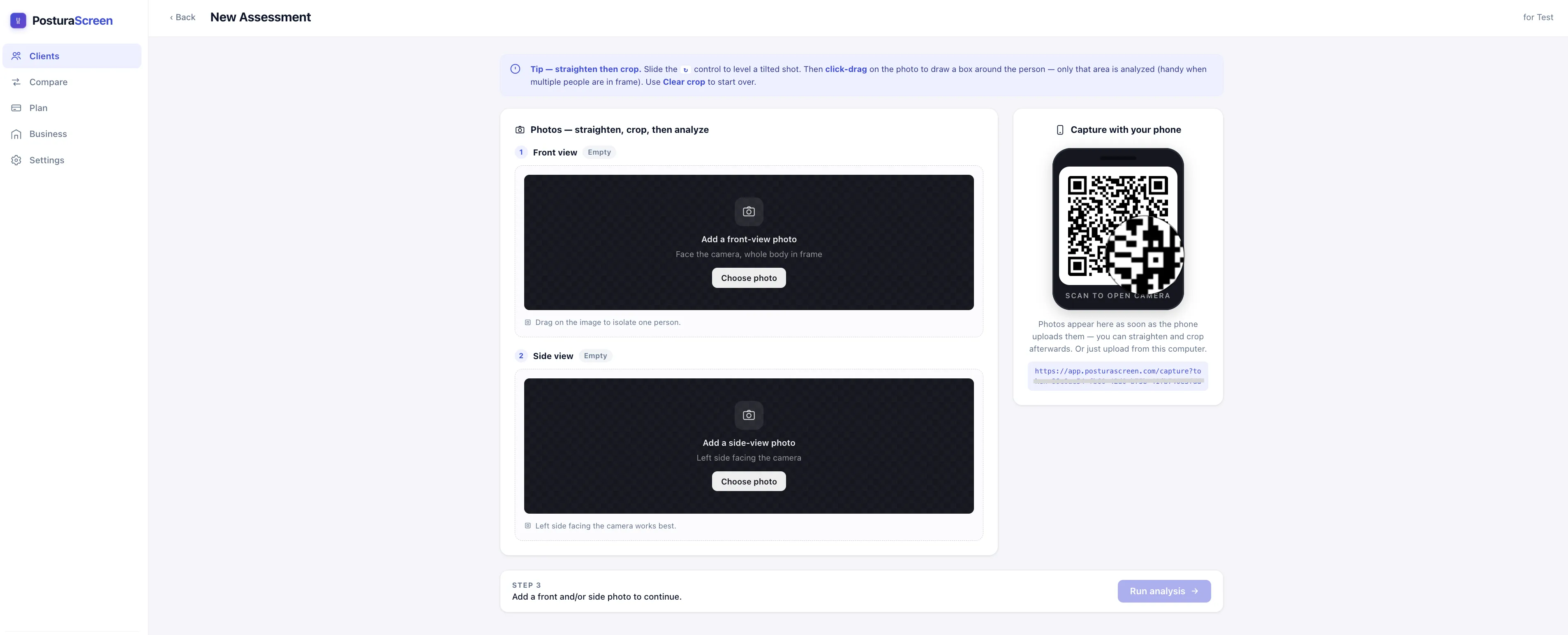
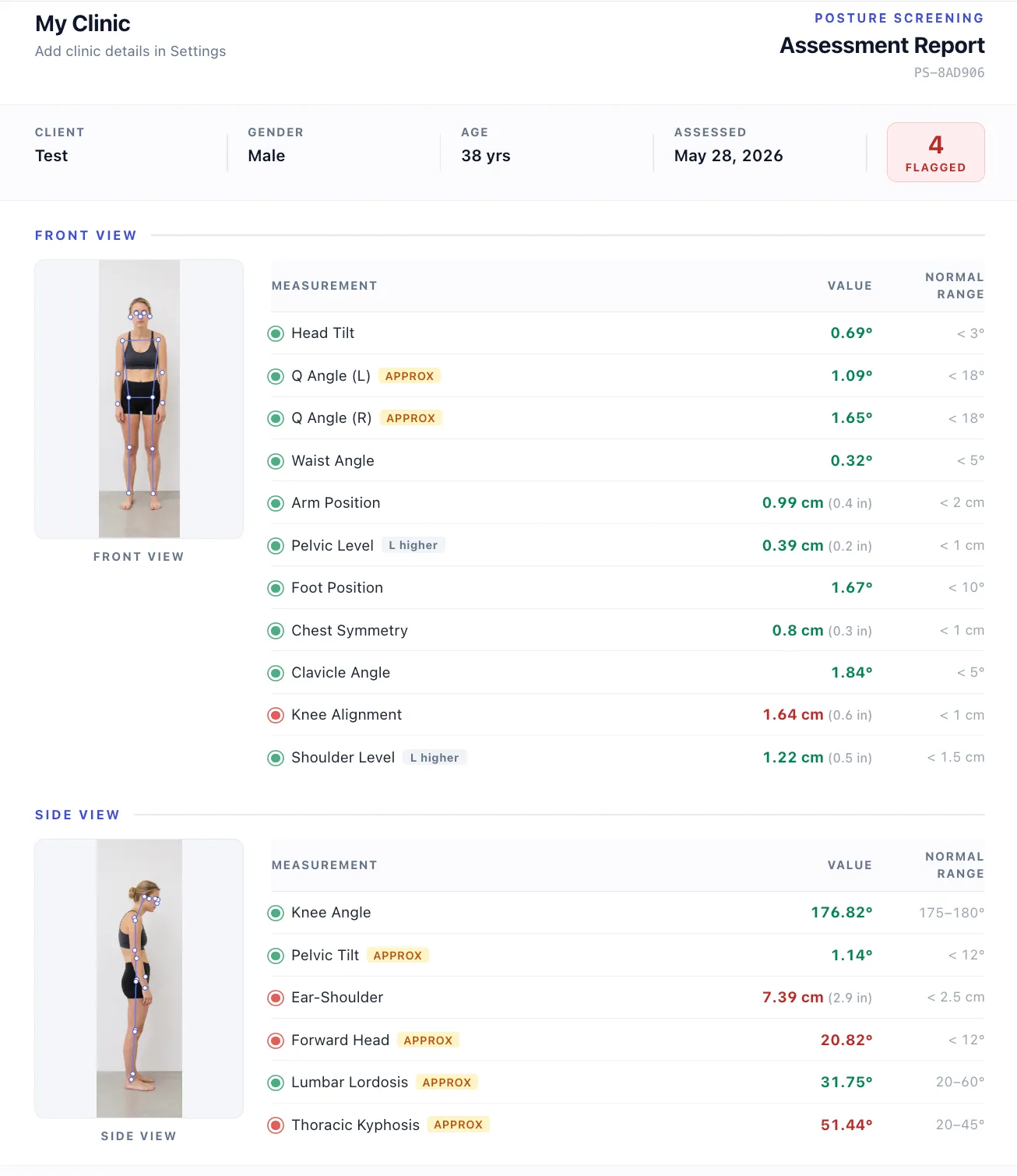
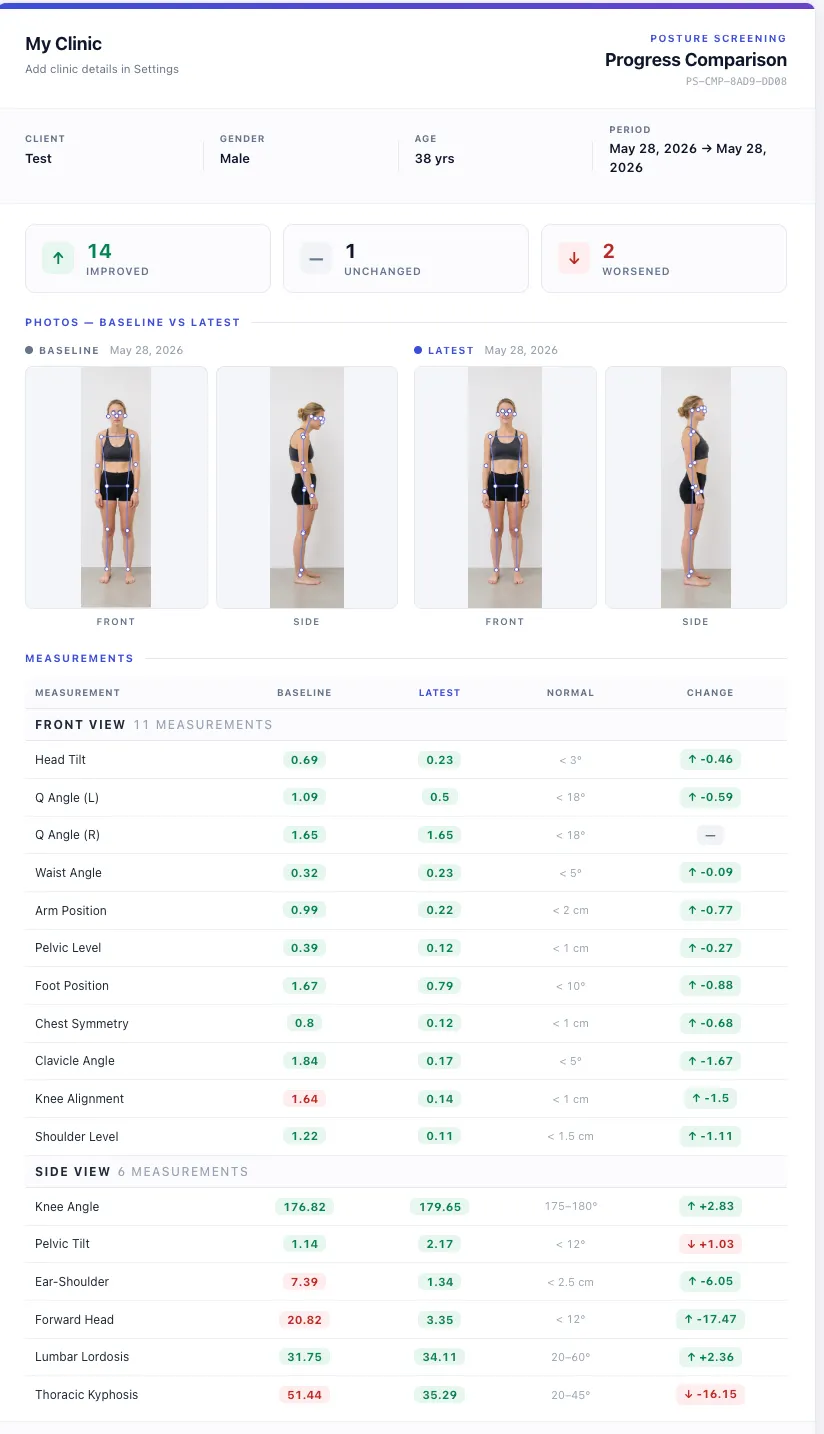
Choose the right workflow
- Free Personal
- Personal checks
- Pro · A$19.90/month
- Client assessments and branded PDFs
- Clinic · Contact us
- Guided setup for your practice
“You look a little rounded.”
Visual posture checks are subjective and hard to repeat. You can feel that a client improved — but it’s difficult to prove, and almost impossible to put on paper.
A screen you can build a service around.
Postural assessment software for intake baselines, program reviews and follow-up assessments. Review measurements, annotated photos and reports with your client, using consistent photo setup when comparing visits.
Posture analysis software that fits how you already work.
The same two-photo screen supports the moments in a practice where an objective posture readout earns its place — without adding a separate posture assessment appointment.
Intake baselines. Capture a posture baseline on the first visit so every later screen has something to compare against. The baseline becomes part of the client's record from day one.
Pre- and post-program reviews. Screen at the start and end of a training or rehab block, then put the two reports side by side to show what changed in numbers, not impressions.
Progress check-ins. Re-screen every few weeks. When a client sees a shoulder-level difference or a forward-head angle trending the right way, they stay engaged with the plan.
Telehealth and remote follow-ups. A client can capture both photos at home on their own phone and the report syncs back to you — useful posture assessment software for hybrid and remote practices.
A consistent, repeatable standard. Keep camera height, distance and standing position consistent between sessions. The software uses the same calculations, but photo setup and landmark detection can affect the measurements.
Posture screening & assessment software, answered.
Is there posture analysis software clinics can use without buying hardware?
Yes. PosturaScreen is browser-based posture screening software — your client scans a QR code and captures a front and side photo on their own phone, or you upload photos from your computer. There's no app to install, no markers to place, and no camera or sensor to buy. It runs in any modern browser.
How is photo-based posture screening different from a visual assessment?
PosturaScreen adds measured values and annotated photos to a visual posture review. The calculations stay the same, but camera setup and landmark detection can affect results. Compare similar photos and use your clinical assessment to interpret the measurements.
Is PosturaScreen posture analysis software, and can I use it for a static postural assessment?
Yes. PosturaScreen is browser-based posture analysis software built for a quick static postural assessment from two standing photos — a front and a side view. It computes 17 posture metrics (11 from the front view, 6 from the side) and returns a clinic-branded report you can walk a client through and re-run to track change. It’s a screening and tracking tool, not a diagnostic or medical device, so it’s designed to support your clinical judgment rather than replace it.
Can I put my clinic's branding on the report?
Yes. Professional plans add your clinic name and details to printable PDF reports with annotated photos and posture measurements.
Is the posture assessment accurate enough for clinical use?
PosturaScreen is a screening and tracking tool, not a diagnostic device or a replacement for radiographic measurement. Front-view symmetry metrics are direct measurements; five metric types (forward head, thoracic kyphosis, lumbar lordosis, pelvic tilt, and Q-angle) are tagged approx as 2D screening estimates. The methodology and the peer-reviewed validity literature behind it are documented in full. It's designed to support clinical judgment, not replace it.
What does PosturaScreen cost for a practice?
Pro is A$19.90/month for individual practitioners. Clinic is tailored to each practice, with guided onboarding and support arranged directly with our team. Personal one-off screening remains free. See full pricing.
How long does a posture screen take during an appointment?
Analysis typically takes about five seconds after upload. Allow additional time to position the camera, capture the photos and review the report with your client.
Add posture screening to your practice.
Choose Pro for self-service professional use, or contact us to plan guided Clinic setup.
Start a free posture screen