The 17 Posture Metrics, Explained: A Visual Glossary
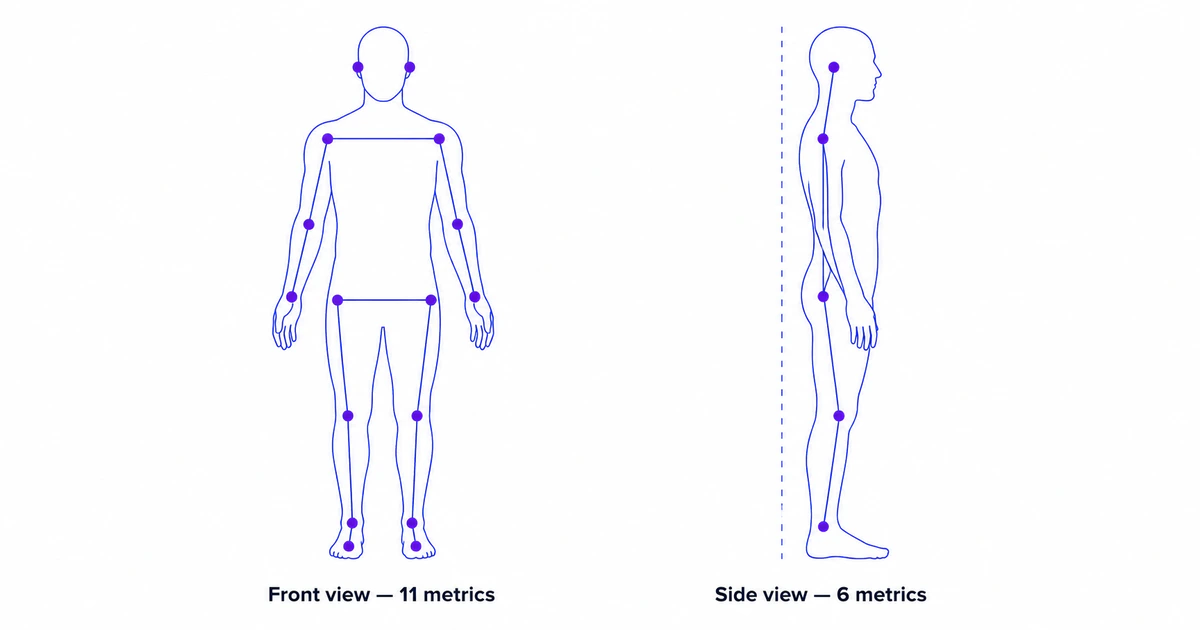
A PosturaScreen report contains 17 posture metrics — 11 measured from a front-view photo and 6 from a side-view photo — each computed as a deterministic geometric calculation from body landmarks. The front-view metrics describe left-right symmetry (shoulder level, pelvic level, head tilt) and alignment (knee, foot, arm position); the side-view metrics describe front-to-back posture (forward head, spinal curves, pelvic tilt). Five of the metric types are tagged approx because they estimate a 3D angle from a 2D photo; the rest are direct surface measurements. This glossary defines each metric, its normal range, and what it represents.
- 17 metrics total: 11 from a front photo, 6 from a side photo (the Q-angle is reported for each leg).
- Every metric is a deterministic geometric calculation from body landmarks — the same input keypoints always produce the same value, with no per-user black box.
- Front-view metrics mostly describe left-right symmetry; side-view metrics describe front-to-back posture and spinal curves.
- Five metric types carry an
approxtag — Forward Head, Thoracic Kyphosis, Lumbar Lordosis, Pelvic Tilt, and Q-angle — because they estimate a 3D angle from a flat photo. The others are direct surface measurements. - The numbers are best for screening and tracking change over time in the same person, not for clinical diagnosis.
The 17 metrics at a glance
| Metric | View | What it measures | Normal range | Type |
|---|---|---|---|---|
| Head Tilt | Front | Eye-line angle vs. horizontal | < 3° | Direct |
| Shoulder Level | Front | Vertical height difference between the shoulders | < 1.5 cm | Direct |
| Clavicle Angle | Front | Collarbone-line angle vs. horizontal | < 5° | Direct |
| Chest Symmetry | Front | Average of the shoulder-height and hip-height differences | < 1 cm | Direct |
| Arm Position | Front | Height difference between the wrists | < 2 cm | Direct |
| Waist Angle | Front | Trunk midline (shoulder midpoint→hip midpoint) vs. vertical | < 5° | Direct |
| Pelvic Level | Front | Vertical height difference between the hips | < 1 cm | Direct |
| Knee Alignment | Front | Height difference between the knees | < 1 cm | Direct |
| Foot Position | Front | Left vs. right lower-leg (knee→ankle) angle difference | < 10° | Direct |
| Q Angle (L) | Front | Hip→knee vs. knee→ankle angle, left leg | M < 18° / F < 22° | Approx |
| Q Angle (R) | Front | Hip→knee vs. knee→ankle angle, right leg | M < 18° / F < 22° | Approx |
| Forward Head | Side | Shoulder→ear angle vs. vertical | < 12° | Approx |
| Ear-Shoulder | Side | Horizontal offset between ear and shoulder | < 2.5 cm | Direct |
| Thoracic Kyphosis | Side | Upper-back curve proxy from the ear-shoulder-hip angle | 20–45° | Approx |
| Lumbar Lordosis | Side | Lower-back curve proxy from the shoulder-hip-knee angle | 20–60° | Approx |
| Pelvic Tilt | Side | Hip→knee line vs. vertical (unsigned) | < 12° | Approx |
| Knee Angle | Side | Hip-knee-ankle angle | 175–180° | Direct |
What the 17 posture metrics are
A PosturaScreen report is built from two photographs: one taken from the front and one from the side. From the front photo, the system computes 11 metrics; from the side photo, 6. Together they describe how the body is arranged in three dimensions, even though each individual measurement comes from a flat 2D image.
The two views answer different questions. The front view is about left-right symmetry and alignment — is one shoulder higher than the other, do the hips sit level, do the knees track evenly. The side view is about front-to-back posture — does the head sit forward of the shoulders, how pronounced the spinal curves look, how far the thigh line leans from vertical. This is why patterns like posture asymmetry are read from the front, while patterns like tech neck and anterior pelvic tilt are read from the side.
Every metric is a deterministic geometric calculation from detected body landmarks. There is no per-user model adjustment and no learned-output black box: the same input keypoints always produce the same metric values. The methodology page documents the exact per-metric formulas, and the 17 metrics page shows how they appear in a live report. The rest of this glossary defines each metric, grouped by body region.
Head and neck metrics
Head Tilt
Head Tilt is a front-view metric: the angle of the eye-line relative to horizontal. A perfectly level head reads near 0°; a head that leans toward one shoulder produces a larger value. The screening range is under 3°. It is a direct measurement, because it compares two landmarks (the eyes) at the same depth in the photo. A persistent head tilt often travels alongside a shoulder-height difference.
Forward Head
Forward Head is a side-view metric: the angle from the shoulder to the ear relative to vertical, with a screening range under 12°. It captures how far the head sits ahead of the shoulders — the defining sign of forward head posture and the screen-related pattern commonly called tech neck. It carries an approx tag because it estimates a sagittal angle from a 2D photo, where surface contour and depth both influence the result. It is not the clinical craniovertebral angle; see how this differs from the clinical CVA.
Ear-Shoulder
Ear-Shoulder is the horizontal offset between the ear and the shoulder, measured from the side and reported in centimeters, with a screening range under 2.5 cm. It is a companion to Forward Head: where Forward Head expresses the relationship as an angle, Ear-Shoulder expresses it as a distance. It is a direct measurement rather than an estimate, since it compares two landmarks at the same depth.
Shoulder and upper-body metrics
Shoulder Level
Shoulder Level is the vertical height difference between the left and right shoulder landmarks, reported in centimeters with a screening range under 1.5 cm. It is the most recognizable sign of posture asymmetry. It is a direct measurement, and a report will usually note which side sits higher.
Clavicle Angle
Clavicle Angle is the angle of the collarbone line relative to horizontal, with a screening range under 5°. It typically shifts in the same direction as a shoulder-height difference and provides a second, independent read on upper-body symmetry. It is a direct measurement.
Chest Symmetry
Chest Symmetry is the average of two left-right height differences — shoulder to shoulder and hip to hip — reported in centimeters with a screening range under 1 cm. It gives a combined read on whether the trunk sits level from side to side. It is a direct measurement.
Arm Position
Arm Position is the height difference between the left and right wrists, reported in centimeters with a screening range under 2 cm. It reflects whether the arms hang evenly — a useful symmetry cue, though it is also sensitive to how relaxed the arms were at the moment of capture. It is a direct measurement.
Spinal curve metrics
Thoracic Kyphosis
Thoracic Kyphosis is a side-view estimate of the upper-back curve. A photo has no spine landmarks, so PosturaScreen approximates it from the angle at the shoulder between the ear and hip landmarks, plus a fixed baseline so the value can be read against the 20–45° reference range, which comes from X-ray (Cobb angle) studies. Some thoracic curve is normal and healthy; the metric gives a rough sense of how rounded the upper back looks and forms one part of patterns such as swayback posture. It carries an approx tag because it is a 2D proxy, not a Cobb angle or any other measurement of the spine itself.
Lumbar Lordosis
Lumbar Lordosis is the side-view estimate of the lower-back curve, approximated from the angle at the hip between the shoulder and knee landmarks plus the same fixed baseline, and read against a 20–60° X-ray reference range. Like thoracic kyphosis, a natural lumbar curve is expected; the metric gives a rough sense of its degree. It is also approx, for the same reason — it is a 2D proxy from body landmarks, not a measurement of the spine from imaging.
Trunk and pelvis metrics
Waist Angle
Waist Angle is a front-view metric: how far the trunk midline — the line from the shoulder midpoint to the hip midpoint — leans away from vertical, with a screening range under 5°. It captures whether the trunk is tilted to one side. It is a direct measurement.
Pelvic Level
Pelvic Level is the vertical height difference between the left and right hip landmarks, measured from the front with a screening range under 1 cm. This is the frontal description of the pelvis — a side-to-side hip-height difference, sometimes called a “hip hike,” covered in the posture asymmetry guide. It is a direct measurement.
Pelvic Tilt
Pelvic Tilt is the sagittal side of the pelvis picture: a side-view proxy measured as how far the hip-to-knee line leans from vertical, with a screening range under 12°. The value is unsigned — it shows how large the deviation is, not whether the pelvis tips forward or back — so it cannot by itself tell anterior pelvic tilt from posterior pelvic tilt. It is important not to confuse it with Pelvic Level: one is the front-view side-to-side difference, the other is a side-view front-to-back estimate, and they are measured from different photos. Pelvic Tilt carries an approx tag.
Leg and knee metrics
Knee Alignment
Knee Alignment is the height difference between the left and right knees, measured from the front in centimeters with a screening range under 1 cm. It describes whether the knees sit level with each other. It is a direct measurement.
Q Angle (left and right)
The Q-angle is the angle between the hip-to-knee line and the knee-to-ankle line, reported separately for each leg. PosturaScreen uses a screening range of under roughly 18° for men and 22° for women. It is used as a screening proxy for knee-tracking tendencies (a valgus or varus lean). It carries an approx tag because estimating the hip-knee-ankle angle from a flat photo involves inferring positions that are not all at the same depth. A notable difference between the two legs, or knee pain, is worth a clinician’s assessment; the OrthoInfo guide to patellofemoral pain from the American Academy of Orthopaedic Surgeons covers kneecap tracking and when knee pain warrants evaluation.
Knee Angle
Knee Angle is a side-view metric: the angle at the knee formed by the hip-to-knee and knee-to-ankle vectors, with a screening range of 175–180°. A nearly straight standing knee reads close to 180°; a smaller value indicates a bent or hyperextended knee at rest. It is a direct measurement.
Foot Position
Foot Position is a front-view metric: the difference between the angles of the left and right lower legs (knee to ankle), with a screening range under 10°. The body-landmark model has no points on the feet, so it does not measure foot rotation or turn-out; it reads whether the two shins line up similarly in the standing stance. It is a direct measurement.
What the “approx” tag means
Five of the metric types carry an approx tag: Forward Head, Thoracic Kyphosis, Lumbar Lordosis, Pelvic Tilt, and the Q-angle (reported as six rows in total, since the Q-angle appears for each leg). The tag marks the distinction between two kinds of measurement.
The direct metrics compare two landmarks that sit at roughly the same depth in the photo — the left shoulder against the right shoulder, the ear against the shoulder. Comparing same-depth points is something a 2D photo does reliably. The approx metrics, by contrast, estimate a 3D angle or a spinal curve from a flat image: a forward-head angle, a thoracic curve, a hip-to-knee lean. These require inferring depth or spinal shape from a few landmarks, so they are screening estimates rather than exact measurements.
The important point is that approx does not mean unreliable. These estimates are consistent and well-suited to tracking change in the same person over time under similar photo conditions. What they are not is a substitute for radiographic measurement. The methodology page explains the distinction in more detail.
How to read and track your own metrics
A single report is best understood as a screening snapshot, not a verdict. The normal ranges shown next to each metric are population reference values — they indicate where most people fall, not a pass/fail line. A metric outside its range is flagged simply to draw attention to it, not to diagnose anything.
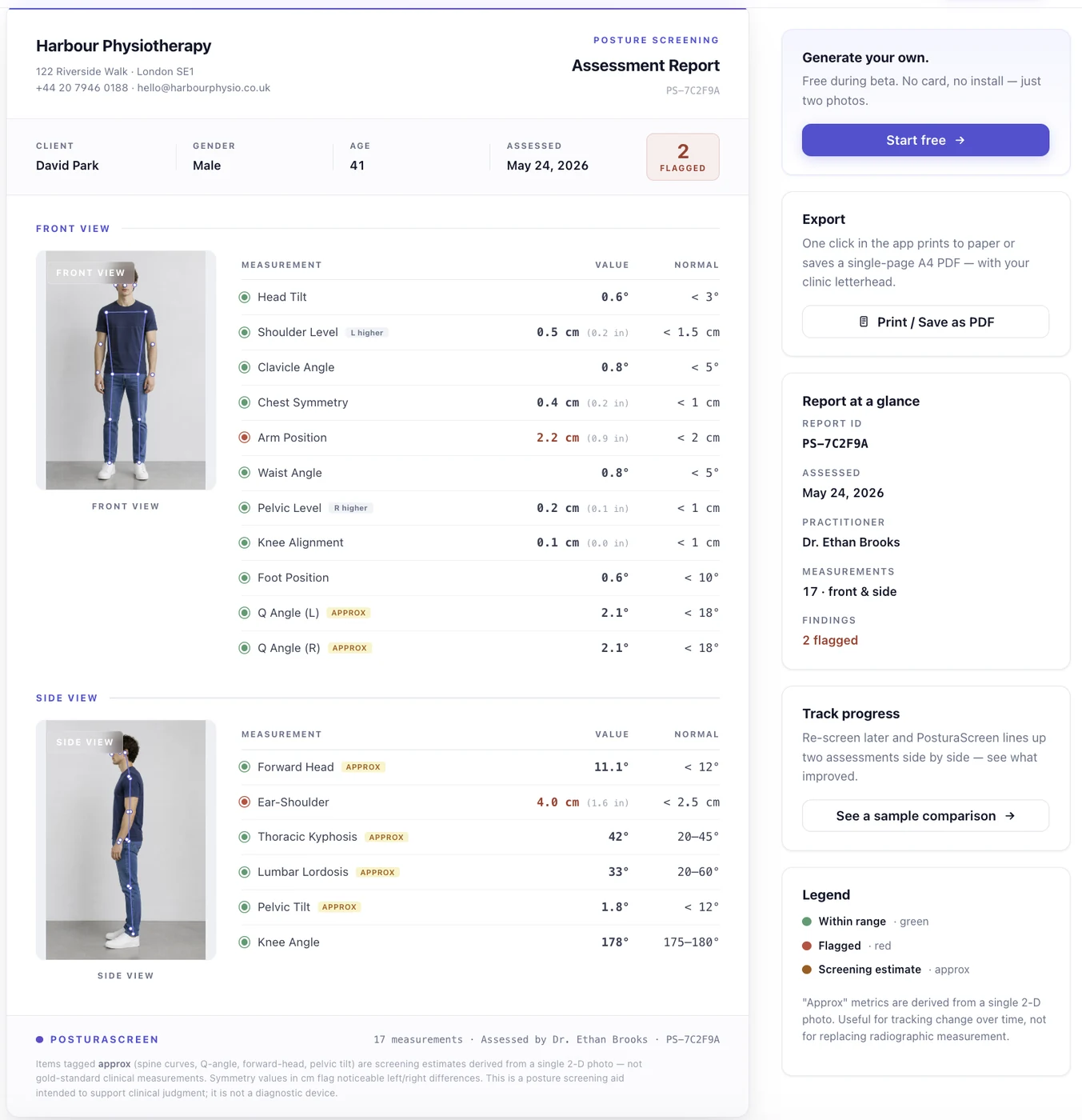
approx). In this sample every value is within its reference range.The strongest use of the numbers is tracking. A shoulder-level difference of 1.8 cm today is most meaningful compared to that same person’s measurement six weeks later, taken with the same camera setup, after a change in habits. The sample report shows what a complete readout looks like, and re-screening under consistent conditions is what turns a one-time snapshot into a useful trend. This is also why clinics that adopt posture screening software for clinics treat each reading as a baseline to track against rather than a standalone verdict.
Practitioners who want to run this same 17-metric screening with their own clients can do so in their practice — the sample report above shows the exact readout a patient receives.
When a metric is notably outside its range, when it is changing over time, or when it occurs alongside pain, stiffness, or restricted movement, the right next step is a conversation with a licensed physiotherapist, physician, or chiropractor. They can integrate the measurements with a physical examination and history. PosturaScreen is a screening and tracking tool, not a diagnostic device, and the information in this glossary is educational rather than medical advice.
Frequently asked questions
How many metrics does PosturaScreen measure?
17 in total — 11 from a front-view photo and 6 from a side-view photo. The Q-angle is reported separately for the left and right leg. Front-view metrics mostly describe left-right symmetry and alignment; side-view metrics describe front-to-back posture and spinal curves.
What does the “approx” tag on a metric mean?
Five metric types carry an approx tag — Forward Head, Thoracic Kyphosis, Lumbar Lordosis, Pelvic Tilt, and Q-angle (left and right). These estimate a 3D angle or a spinal curve from a flat 2D photo, so they are screening estimates rather than direct measurements. They are reliable for tracking change in the same person over time, but they do not replace radiographic measurement.
Which posture metrics are direct measurements?
The left-right symmetry and alignment metrics measured from the front photo — Head Tilt, Shoulder Level, Clavicle Angle, Chest Symmetry, Arm Position, Waist Angle, Pelvic Level, Knee Alignment, Foot Position — plus Ear-Shoulder and Knee Angle from the side. These compare two landmarks at the same depth, which is more directly measurable from a photo than estimating a 3D angle.
What is a normal Q-angle?
PosturaScreen uses a screening range of under roughly 18° for men and 22° for women, reported for each leg. The Q-angle is the angle between the hip-to-knee line and the knee-to-ankle line, used as a screening proxy for knee-tracking tendencies. It is tagged approx because estimating it from a 2D photo involves depth inference. A notable difference or knee pain is worth a clinician’s assessment.
Are the normal ranges a pass/fail test?
No. The normal ranges are population reference values, not a pass/fail grade. A metric outside its reference range is flagged simply to draw attention — it does not constitute a diagnosis. The most useful way to read the numbers is to track the same person over time under consistent photo conditions, not to treat a single reading as a verdict.
Can these metrics diagnose a posture problem?
No. The 17 metrics are screening and tracking measurements, not diagnostic findings. They describe what a photo shows about body geometry. A diagnosis requires a clinician who can integrate the measurements with a physical examination and history. PosturaScreen is a screening and tracking tool, not a diagnostic device.
This article was prepared by the PosturaScreen editorial team for posture education. It is not medical advice and is not a substitute for a clinical evaluation. PosturaScreen is a screening and tracking tool, not a diagnostic device. If you have concerns about your posture or musculoskeletal health, consult a licensed healthcare professional. See our editorial standards for how this article was written and reviewed.
Free posture screening, in seconds.
Start with one photo. Add the second for all 17 metrics. No account or app required.
Start a free posture screen