How to Add Posture Screening as a Paid Service
Posture screening is one of the few add-on services a movement practice can introduce without new equipment, new rooms, or a new appointment type — it fits inside the visit you already run. This playbook covers where an objective posture screen fits in a practice, how to position it to clients, how to think about pricing it (with a fill-in-your-own-numbers model, not a promise), and the two-photo workflow whose AI analysis usually takes about five seconds after capture. It’s a practical guide for practitioners evaluating whether to add screening — not a claim about what it will earn.
- Posture screening adds an objective, repeatable service to a practice with no new hardware — it fits inside existing intake and progress visits.
- The business value is differentiation, client engagement, and showing progress — turning a subjective “you look rounded” into something measurable a client keeps.
- Position it as part of intake and progress reviews, not a standalone upsell — that’s where it feels natural and adds value.
- Pricing is your call — bundle it into intake, charge a small standalone fee, or use it as a free differentiator. This guide gives a model to think it through, not a number to expect.
- It’s a screening and tracking tool, not a diagnostic device — it supports your clinical judgment, it doesn’t replace your examination.
Why posture screening is an easy service to add
Most new services a movement practice considers come with friction: a piece of equipment to buy, a room to free up, staff to train, a new appointment type to schedule. Posture screening is unusual because it carries almost none of that. There’s no hardware — the client takes the photos on their own phone. There’s no new room — it happens in the visit you’re already running. And there’s no long protocol — the analysis takes about five seconds.
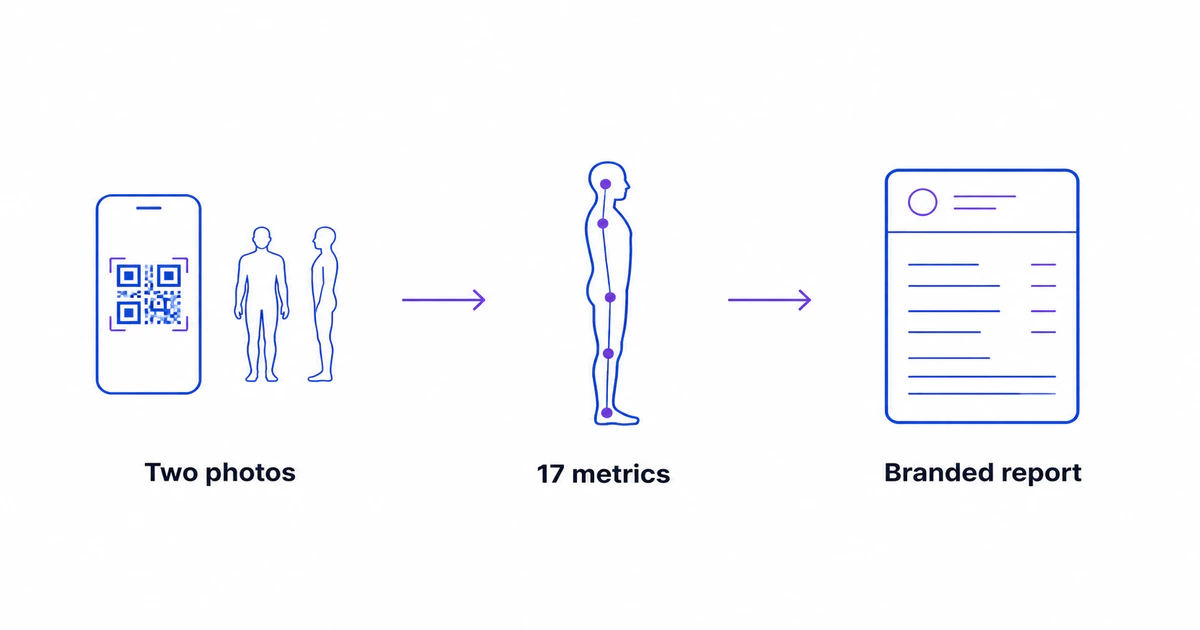
The mechanics are simple. The client scans a QR code, takes a front and a side photo, and the images appear on your screen (or you upload them yourself). A model locates body landmarks and computes a set of posture metrics, and a clean, clinic-branded report is ready to review and send. Because it slots into an existing visit rather than replacing or extending it, the friction of adding it is low — which is the whole reason it works as a service rather than a project. The posture screening software for clinics page covers the product side; this guide is about how to actually fold it into a practice.
Where it fits in a practice
The most natural homes for a posture screen are the moments where an objective baseline already matters: intake and progress.
At intake, a screen gives you and the client a shared, objective starting point. Instead of an impression, you have a documented baseline — shoulder level, forward-head position, spinal curves, and the rest of the posture metrics — that you can refer back to. It frames the relationship around measurement from the first visit.
At progress reviews, the same screen becomes a before-and-after. Re-screen at the end of a training or rehab block, put the two reports side by side, and the change is visible in numbers rather than memory. For programs that run weeks or months, a periodic re-screen — say monthly — turns “I think you’re moving better” into something you can show.
The key positioning point is that a posture screen works best as part of these visits, not as a standalone upsell bolted onto the end. It’s an enhancement to intake and review, which is where it feels natural to the client and useful to you. The sample report shows what the output looks like in the client’s hands.
The business case — differentiation and engagement
It’s worth being precise about where the business value of posture screening actually comes from, because it isn’t diagnosis. The value is operational and relational, and there are three honest threads to it.
Differentiation. Most movement practices don’t offer an objective posture readout. Adding one is a low-cost way to make intake and progress visits feel more thorough and more modern — a small point of difference in a crowded market.
Engagement and adherence. Clients who can see measurable change tend to stay engaged with a program. A report that shows a shoulder-height difference narrowing, or a forward-head angle trending the right way, gives a client a concrete reason to keep going. This is a plausible mechanism, not a guaranteed outcome — how much it helps will vary by practice and by client.
A branded touchpoint. The report goes home with your clinic’s name on it. Clients keep it, sometimes share it, and it becomes a small ongoing reminder of where it came from.
A necessary caveat runs through all three: these are plausible business benefits, not guaranteed results, and they’ll vary from practice to practice. This guide can’t and won’t promise a revenue figure — what it can do is help you think clearly about whether the fit is there for you.
How to think about pricing it
Pricing a posture screen is genuinely your decision, because it depends on your clientele, your existing fee structure, and what you want the service to do. Rather than prescribe a number, here are three models practices commonly use:
- Bundled into intake. Include the screen at no extra charge as a differentiator that makes the intake visit feel more complete. The screen isn’t a line item; it’s a reason to choose your practice.
- A small standalone fee. Offer the screen as a brief paid mini-service — a quick, objective posture check a client can book on its own or add to a visit.
- A free lead magnet. Offer a free screen to attract new clients or fuel referrals, on the logic that the value is in the relationship it starts.
To weigh any of these, it helps to model the value with your own numbers rather than a figure someone else invented. A simple way to frame it: if you add a screen to a number of intake visits each month, and it helps even a fraction of those clients commit to or continue a program, you can estimate the value as your own client value × your own estimated lift. Plug in your own numbers — we’re not going to pretend to know your practice’s economics, and any specific figure we put here would be a guess dressed up as a fact. Include the professional PosturaScreen subscription as an operating cost; personal one-off screening is free, while multi-client workflows and clinic branding use Pro or Clinic. The current plans are on the pricing page.
The workflow, start to report
In practice, a screen is three short steps that fit inside a normal visit.
Capture. Start an assessment and show the QR code. The client scans it and takes a front and a side photo on their own phone, and the images sync to your screen — or you upload them from your computer.
Analyze. The system detects body landmarks and computes the metrics, flagging anything outside its reference range, typically in under five seconds after capture. The first run can take up to about 30 seconds while the service starts. Five of the metric types — forward head, thoracic kyphosis, lumbar lordosis, pelvic tilt, and the Q-angle — carry an honest approx tag, because a 2D photo estimates those rather than measuring them the way a radiograph would. The methodology page documents exactly how each metric is computed.
Review and send. Walk the client through the report, print or send the branded PDF, and re-screen later to show change. The step-by-step product guide covers the clicks in detail.
One boundary is worth stating plainly to keep the service on solid ground: PosturaScreen is a screening and tracking tool, not a diagnostic device. It produces objective screening measurements that support your clinical judgment and give you a repeatable way to show change — it does not replace your examination, your history-taking, or your clinical reasoning.
How to introduce it to clients
The framing that tends to land with clients is simple and honest: “Let’s capture an objective baseline so we can actually see your progress.” That positions the screen as something done for the client’s benefit — a way to make their improvement visible — rather than a test they pass or fail.
It also helps to be upfront about what the numbers do and don’t mean. A short, plain explanation — “these are screening measurements from a photo, useful for tracking your change over time, not a medical diagnosis” — does more for trust than overstating precision would. Clients appreciate a practitioner who explains the limits of a tool; it signals that the practitioner understands it. If a client wants to keep an eye on their posture between visits, the how to check your posture at home guide is a useful thing to share.
Used this way — as an objective baseline, a visible progress marker, and a branded report the client keeps — posture screening becomes a small, low-friction service that strengthens the visits you already run, without overpromising what it is.
Frequently asked questions
Is posture screening hard to add to a practice?
No — that’s the main appeal. It needs no new equipment, no extra room, and no separate appointment type. The client takes two photos on their own phone via a QR code; after capture, the AI analysis usually finishes in about five seconds, although a first run can take longer while the service starts. It fits inside the intake or progress visit you already run, which is why it’s one of the lower-friction services a movement practice can add.
How should I price a posture screen?
That’s your call, and it depends on your practice. Three common approaches are to bundle it into intake as a free differentiator, charge a small standalone fee, or use it as a free lead magnet. Model the value with your own numbers and include the professional PosturaScreen plan as an operating cost; personal one-off screening is free, while client workflows use Pro or Clinic.
What’s the actual business value if it doesn’t diagnose anything?
The value is operational, not diagnostic: it turns a subjective “you look a bit rounded” into an objective, repeatable readout a client can see and keep. That supports differentiation (most practices don’t offer it), engagement (clients who see measurable change tend to stay engaged with a program), and a branded report that goes home with your name on it. These are plausible business benefits, not guaranteed results — they’ll vary by practice.
Will it replace my hands-on assessment?
No, and it shouldn’t. PosturaScreen is a screening and tracking tool, not a diagnostic device. It produces objective screening measurements that support your clinical judgment and give you a repeatable way to show change over time. Your examination, history-taking, and clinical reasoning remain exactly where they were — the screen is an addition, not a replacement.
How do I explain the “approx” tags to a client?
Honestly and simply: five metric types — Forward Head, Thoracic Kyphosis, Lumbar Lordosis, Pelvic Tilt and Q-angle (L/R) — are screening estimates from a 2D photo, tagged “approx,” because a photo isn’t an X-ray. They’re reliable for tracking change in the same person over time, which is the point of screening. Being upfront about this actually builds trust — clients appreciate a practitioner who explains what a number does and doesn’t mean.
Can I put my clinic’s branding on the reports?
Yes. On Pro, the report carries your clinic name, address and practitioner details, and exports to a print-ready two-page PDF (results, then a summary of flagged items) in one click. Clients keep it, which makes it a small ongoing brand touchpoint. The branding is part of why it works as a service rather than just an internal tool.
This article is for practitioners and is general business information, not financial, legal, or medical advice. PosturaScreen is a screening and tracking tool, not a diagnostic device, and does not replace clinical examination. Any revenue or retention benefits described are illustrative and will vary by practice. See our editorial standards for how this article was written and reviewed.
A faster posture workflow for your clinic.
Two photos, an objective report, and no new hardware. AI analysis usually finishes in seconds after capture.
See the clinic workflow